
2026-05-28
Stream Processing with Apache Flink. Part-5
Real-time processing of F1 event streams
Stream Processing with Apache Flink. Part-5: Real-time F1
This is a series of blog posts about Stream processing with Apache Flink. I've previously shared concepts
behind the Flink engine, creating streaming data pipelines, packaging and deploying Flink
applications and how it integrates with external systems like Kafka, Snowflake and cloud providers.
In this post, we'll look at how I simulate an F1 real-time processing application using Flink, Kafka-compatible broker(redpanda) and ClickHouse.
🔗 Source Code: abyssnlp/flink-datastream/real-time-f1
Here is the entire series so far. I'll keep updating this as and when they're published:
- Stream Processing with Apache Flink. Part-1
- Stream Processing with Apache Flink. Part-2: DataStream Hands-on with Java
- Stream Processing with Apache Flink. Part-3: CDC to Iceberg Table
- Stream Processing with Apache Flink. Part-4: Datastream Enrichment
- Stream Processing with Apache Flink. Part-5: Real-time F1 (You're here)
Contents
- Introduction
- Architecture
- Setting up the stack
- Dataset
- Flink job
- Grafana dashboard
- Running everything
- Learnings
- Conclusion
Introduction
This post is a follow-up from my previous blog post about analysing F1 race events using Airflow, ClickHouse and dbt. It was a fun project to play around with the new Airflow 3 features and the F1 dataset from Open F1. It got me thinking how teams that participate in F1 actually use data in real-time to understand what's going on in the race, the car, the track and the driver.
I got this from an article in the Mercedes AMG Petronas F1 team's blog:
Across a race weekend, the total amount of data generated per car, including video and ancillary information, is over 1 terabyte and this increases substantially (by two or three times) once we do the necessary post-processing of some of the data during or after the event.
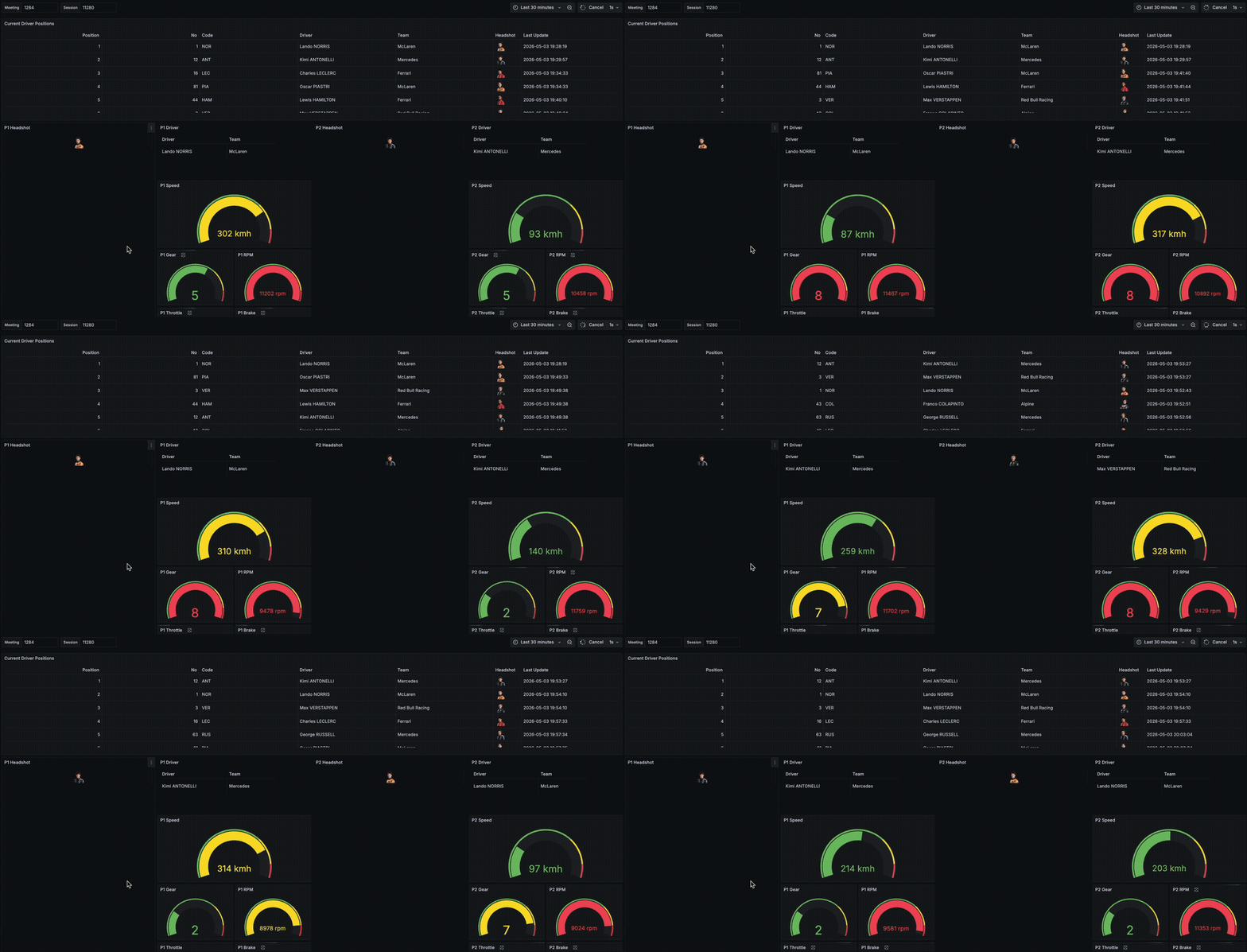
While I did not find a dataset that contains data for what each of the teams get from their sensors over the course of a sprint, qualifying or race, I decided to simulate a real-time race awareness dashboard that shows the current driver positions, some car data about their speeds, brake, throttle and RPM as well as location data.
Architecture
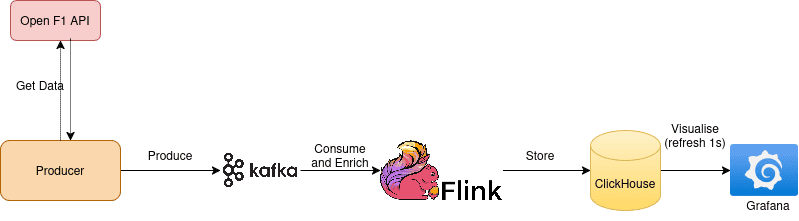
The architecture is simple. We fetch and produce the data to Kafka, process and enrich data in Flink and store it async to ClickHouse. Grafana runs queries on ClickHouse every second to provide a real-time view of driver positions, location and car data.
Setting up the stack
You need to have docker, python, uv and Java 17 SDK to develop and run the stack.
I've used the following technologies for this project (everything runs as containers via docker):
- Apache Flink 2.0 with Java 17 (1 Jobmanager and 2 task managers)
- Redpanda (Kafka compatible message broker)
- Redpanda console (UI to manage Kafka topics and consumer groups)
- ClickHouse (Real-time OLAP Data store)
- Grafana (Visualisation) with ClickHouse datasource plugin
The stack is orchestrated via docker-compose.yml.
To start the stack, run from the root of the project:
1docker compose up -d
To verify, check the container status using:
1docker ps -a
Look for any container that might have exited and check the logs to troubleshoot.
The following should also be available on your localhost:
localhost:8081: Flink UIlocalhost:8080: Kafka (Redpanda) consolelocalhost:3000: Grafana UI
Dataset
To simulate streaming F1 race events, I fetch the data from the OpenF1 endpoints, specifically:
position: Positions for each driver as the race progresseslocation: Location for each driver as x, y, z coordinatescar_data: Car data (speed, gear, throttle, rpm, brake) for each driver over timedrivers: Metadata about each driver (name, team name, headshot_url etc.)
The drivers dataset would be a small dimension table that will enrich the position, location and car_data real-time event streams.
I only get the data for the recent Miami Grand Prix 2026 where Kimi Antonelli takes up the pole position again.
The producer works as follows:
- It fetches data from the 4 OpenF1 endpoints.
- Combines telemetry events from all topics into one list.
- Sorts records by event time.
- Emits them based on the replay speed to Kafka.
From the data, I could infer that the race time gap between events is on average 60 seconds. Different replay speeds produce different speeds at which data is emitted compared to this race time gap and affects how you see it on the Grafana dashboard.
For example:
F1_REPLAY_SPEED=1 means wait 60 seconds (original race-time gap) between events.F1_REPLAY_SPEED=60 means wait 1 second between events (events that according to their timestamp are 60 seconds apart are produced every 1 second).F1_REPLAY_SPEED=120 means wait 0.5 seconds between events.
This matters because position, location, and car_data are separate OpenF1 endpoints and Kafka topics. Without event time replay, one topic could run far ahead of another, making Grafana updates look inconsistent: car speed could reflect one moment while location reflects another. Sorting all telemetry together by timestamp makes Kafka arrival order roughly follow race time across topics.
Flink job
Job flow shape
The Flink job reads 4 Kafka topics: f1_drivers, f1_car_data, f1_location, f1_position, configured via env vars. You can refer to the Makefile at the root of the repository for the env vars being passed to the job.
It uses checkpointing with exactly-once once every 120 seconds. The flow looks like this:
For the f1_drivers topic, the job consumes and
- writes drivers data to ClickHouse sink
- broadcastes state so other event streams can consume it (drivers topic only has 22 records (22 drivers in the Miami race))
For the event streams in f1_car_data, f1_location and f1_position:
- deserialize JSON + Kafka metadata
- key by meeting_key + session_key + driver_number
- connect with drivers broadcast state
- enrich with driver metadata (driver name, team name, headshot_url etc.)
- store in ClickHouse JSONEachRow sinks
The driver stream uses the value-only JSON deserializer (JsonDeserializationSchema) as we don't need the Kafka metadata for it. The others require the Kafka metadata (KafkaRecordDeserializationSchema) for the partition and offsets to compute the version which we will use later in ClickHouse.
Broadcast State
Driver attributes are reference data. The job broadcasts the Driver stream into a MapStateDescriptor<String, Driver>, keyed by:
meeting_key|session_key|driver_number. This is to avoid incorrectly joining the same driver number across different meetings/sessions. While we're only using data from the Miami 2026 Grand Prix, we can reuse the code if we stream for additional races without any changes.
1MapStateDescriptor<String, Driver> driversBroadcastStateDescriptor =
2                new MapStateDescriptor<>("drivers_by_meeting_session_number", String.class, Driver.class);
3
4BroadcastStream<Driver> broadcastDriversStream =
5        driversStream.broadcast(driversBroadcastStateDescriptor);
6
7// Car Data + Driver
8DataStream<EnrichedCarData> enrichedCarDataDataStream = carDataStream
9        .keyBy((record) -> driverJoinKey(
10                record.carData().meeting_key(),
11                record.carData().session_key(),
12                record.carData().driver_number()
13        ))
14        .connect(broadcastDriversStream)
15// ...
Keyed List State
Each event stream is keyed by the composite key described in the previous section, before being connected to the broadcast driver stream. If events arrive before its driver metadata, the record is stored in the keyed ListState.
Note: If you compare this to real-world scenarios, you'd usually have dimension tables stored in a database/warehouse/lake somewhere and load it at the start of the job to enrich the events.
For the car data, the job checks the broadcast state first. If the driver exists, it emits the enriched data immediately. If not, it appends the record to the it's keyed state in, for ex. pending_car_data.
When the driver record arrives later on the broadcast side, the processing function writes it into broadcast state, scans the keyed pending state and emits all buffered records that driver key. It clears the keyed state once done.
One thing to note here, there is no TTL or timer cleanup for the keyed state, if a driver metadata never arrives, pending events for that key are never emitted and remains in the state.
1DataStream<EnrichedCarData> enrichedCarDataDataStream = carDataStream
2    .keyBy((record) -> driverJoinKey(
3            record.carData().meeting_key(),
4            record.carData().session_key(),
5            record.carData().driver_number()
6    ))
7    .connect(broadcastDriversStream)
8    .process(new KeyedBroadcastProcessFunction<String, CarDataWithOffset, Driver, EnrichedCarData>() {
9        private final ListStateDescriptor<CarDataWithOffset> pendingCarDataDescriptor =
10                new ListStateDescriptor<>(
11                        "pending_car_data",
12                        TypeInformation.of(CarDataWithOffset.class)
13                );
14
15        @Override
16        public void processElement(
17                CarDataWithOffset record,
18                ReadOnlyContext context,
19                Collector<EnrichedCarData> out
20        ) throws Exception {
21            CarData car = record.carData();
22            ReadOnlyBroadcastState<String, Driver> driversState =
23                    context.getBroadcastState(driversBroadcastStateDescriptor);
24            Driver driver = driversState.get(driverJoinKey(
25                    car.meeting_key(),
26                    car.session_key(),
27                    car.driver_number()
28            ));
29
30            if (driver != null) {
31                out.collect(enrichCarData(record, driver));
32            } else {
33                getRuntimeContext().getListState(pendingCarDataDescriptor).add(record);
34            }
35        }
36
37        @Override
38        public void processBroadcastElement(
39                Driver driver,
40                Context context,
41                Collector<EnrichedCarData> out
42        ) throws Exception {
43            context.getBroadcastState(driversBroadcastStateDescriptor)
44                    .put(driverJoinKey(
45                            driver.meeting_key(),
46                            driver.session_key(),
47                            driver.driver_number()
48                    ), driver);
49
50            String driverKey = driverJoinKey(
51                    driver.meeting_key(),
52                    driver.session_key(),
53                    driver.driver_number()
54            );
55
56            context.applyToKeyedState(pendingCarDataDescriptor, (key, pendingCarData) -> {
57                if (driverKey.equals(key)) {
58                    for (CarDataWithOffset pendingRecord : pendingCarData.get()) {
59                        out.collect(enrichCarData(pendingRecord, driver));
60                    }
61                    pendingCarData.clear();
62                }
63            });
64        }
65    })
66    .name("Enrich Car Data With Drivers");
Enriched data
The enriched records keep the events and adds the driver metadata: full_name, name_acronym, team_name and headshot_url.
For example, the EnrichedCarData contains the following fields:
1public record EnrichedCarData(
2        Instant date,
3        int driver_number,
4        long session_key,
5        long meeting_key,
6        int speed,
7        short n_gear,
8        int rpm,
9        int throttle,
10        int brake,
11        String full_name,
12        String name_acronym,
13        String team_name,
14        String headshot_url,
15        long version
16) {
17    public String toClickHouseJson() {
18        return ClickHouseJson.object(
19                "date", ClickHouseJson.dateTime(date),
20                "driver_number", driver_number,
21                "session_key", session_key,
22                "meeting_key", meeting_key,
23                "speed", speed,
24                "n_gear", n_gear,
25                "rpm", rpm,
26                "throttle", throttle,
27                "brake", brake,
28                "version", version,
29                "full_name", full_name,
30                "name_acronym", name_acronym,
31                "team_name", team_name,
32                "headshot_url", headshot_url
33        );
34    }
35}
Computing version for de-duplication
The job also computes a version for the event streams from the Kafka metadata:
1record.partition() * 1_000_000_000_000L + record.offset()
This gives ClickHouse a deterministic, monotonically increasing(-ish) version per Kafka partition. It is useful for de-duplication in ReplacingMergeTree(version) engines for the event streams in ClickHouse. Though note that it is not true event-time ordering across partitions.
ClickHouse sinks
The enriched streams are written to their respective tables using the ClickHouseAsyncSink that converts each record to UTF-8 JSON and writes using the ClickHouseFormat.JSONEachRow format.
The event tables, as mentioned above, use the ReplacingMergeTree(version) engine with:
1partition by (meeting_key, session_key)
2order by (meeting_key, session_key, driver_number, date)
In ClickHouse, this table type treats row with the same ordering key as replaceable versions, keeping the highest version during merges.
To query the data on the ClickHouse side, we need to use the FINAL keyword for getting the de-duplicated version as the merges happen periodically(eventually). On the Grafana side, to get the latest record explicitly, we'll use the argMax(..., date) function.
Grafana dashboard
Grafana spins up along with the rest of the stack. The ClickHouse plugin is already provisioned using the datasources.yaml under grafana/provisioning. I had covered steps to enable the inbuilt ClickHouse monitoring dashboards that can be imported from the plugin. It's quite handy to look at how the cluster is performing and the type of load on the cluster due to the queries coming from the presentation layer (Grafana).
The Grafana dashboard has 3 main types of panels.
- A table with
positiondata about each driver's current position on the track, along with the metadata we had enriched earlier in the Flink job. - 5 driver cards showing the
car_dataof the top 5 drivers according to their current position on the track. This card contains their headshot, braking, throttle, rpm, current gear and the speed. - An XY plot that shows the
locationof the drivers using x, y coordinates from the event stream. I took multiple passes at it to reconstruct the Miami track from historic points and then display the current driver positions on top it but it didn't work out. I let Codex take a crack at it but it failed to do so as well. The verdict: Something like Streamlit would be nice to show charts like this that Grafana doesn't natively support.
The dashboard is set to refresh every 1s but you can modify that from the dashboard settings on the top right.
Side note on my AI assisted coding journey: After being an avid user of Github Copilot, I started evaluating multiple LLM providers to replace my Copilot Pro+ subscription as Github is soon moving to a usage based model with sky high multipliers for the Claude models. Since I mostly used Claude 4.6 Sonnet and Opus for the majority of my tasks, I tried out Claude Pro as well. With a medium-sized codebase, it took me 2 prompts to hit its session window limits. I couldn't justify the
$100or$200for the Claude max subscription (yet). Currently I'm evaluating Codex from OpenAI and I have to say it's good but definitely not at the level of the Anthropic models, especially for the work I do.
Running everything
I've created a Makefile at the root of the project to setup and tear down the job and its components.
To run the project end-to-end, firstly:
- Ensure stack is up via
docker compose up -d. - Package the jar:
mvn clean package, this compiles the Flink job totarget/real-time-f1-1.0.jar. - Create the venv under
producer/usinguv venv. This will be used to run the python scripts for the producer, creating Kafka topics and ClickHouse tables.
Then, run this:
1make run
This will:
- Create the ClickHouse tables.
- Copy the compiled Flink job into the JobManager and execute the Flink job.
- Run the producer to simulate real-time F1 event streams.
Navigate to localhost:3000 to view the F1 dashboard.
If you change/modify something and want to re-run the entire flow, run:
1make destroy
This will drop the tables, kafka topics and even reset offsets in case you want to retain the topics but consume from the start.
Learnings
While this was fun to play around with, I did pick up a few things along the way:
- My initial go at the streaming pipeline was to join the drivers stream with the event streams. This uses a windowed join where it joins records from both streams that share the same join key. However, in this case I overlooked the fact that driver data is just a dimension and not an event(i.e. not temporal). The consequence could be that driver data is joined with the event streams as long as they are in the same window, but there are no joins for the subsequent windows of event streams. The way I tackled this was using BroadcastState. This is a pattern that most distributed systems use when the data involved in a computation is small enough to not impact performance if we have multiple redundant copies of it in each involved worker nodes. This saves network round trips and in scenarios like joins, the computation can happen locally on the worker node itself. In this case, I broadcast the driver data to each worker so it can be used to enrich the event streams as they arrive.
- I ran into another gotcha: cross-topic ordering. Drivers metadata is now being broadcasted to the workers but since Flink reads from the topics concurrently, it is possible that some event streams are processed before the metadata for the driver in those events are consumed and broadcasted. The fix for this was to use the
KeyedBroadcastProcessFunctionwith the combination of driver_number, meeting_key and session_key and buffer the events in a keyedListStateuntil the driver metadata is broadcasted. In case the Broadcast state has the driver metadata for that matching key, the buffer is flushed and emitted. One thing to note here is that the ListState is also keyed so we can safely clear the state for the buffered events of that key once we've flushed it. - ClickHouse's
ReplacingMergeTreeengine does not deduplicate events given the ordering key upon ingestion. It appends to the table and de-duplicates records over time periodically. To enforce or force the de-duplication, it requires theFINALkeyword during querying. Another useful function,argMax(column, ordering_column)can be used to get the latest record for a specified column by ordering it by the temporal column in ascending order.
Conclusion
This was a fun project because it brings together most of the pieces you usually need in a real-time analytics system: event ingestion, stream processing, enrichment, state, de-duplication, OLAP storage and a dashboard on top.
Of course, this is still a simulation. A real F1 telemetry system would have much higher frequency data, stricter latency requirements, more complex joins, better state cleanup, alerting and operational controls. But the shape is similar: events arrive continuously, Flink keeps the real-time view updated, and ClickHouse/Grafana make it queryable and visible.
As always, if you have any questions, corrections, feedback or suggestions, please reach out to me! I'd love to hear your thoughts.